Shopify SEO: How to Get Your Store Ranking on Google

Vishal Arora
Founder, The Marketing Mavericks™ | October 2026 | 6 min read
Shopify SEO comes down to structure, original content and clean technical signals. Shopify already handles the basics: a sitemap, robots.txt, SSL and canonical tags. Your job is to link to the right product URLs, write unique copy for every collection and product, keep apps and images light, check your structured data and handle sold-out products properly. The checklist below puts it all in order.
On this page
Why Shopify Stores Struggle to Rank
Shopify gives every store a solid technical base. Most ranking problems come from thin collection pages, product descriptions copied from the manufacturer, heavy apps and themes that point internal links at the wrong URLs. Shopify's own SEO help guide shows where each setting lives in the admin.
Duplicate Product URLs and Canonical Tags
Every Shopify product can load at more than one address:
- /products/linen-shirt, the main product URL
- /collections/mens-shirts/products/linen-shirt, a collection-aware copy of the same page
Shopify adds a canonical tag to the collection version pointing to /products/linen-shirt, so Google knows which one to index. The catch is that many themes still link to the collection-aware URL from product grids, using the Liquid filter within: collection. Your internal links then point at a page Google is told not to index. Remove that filter from the product card snippet so grids link straight to /products/ URLs. Many recent themes already do this.
Shopify URL Prefixes Are Fine
Shopify fixes the folders: /products/, /collections/, /pages/ and /blogs/. You cannot remove them and do not need to: Google ranks the page, not the folder. Keep the handle after it short and descriptive. If you change a handle, tick the option to create a URL redirect so old links and rankings carry over.
Build a Clear Store Structure
Google understands a store best when it looks like a tree: home page, then collections, then products. Keep every product within three clicks of the home page.
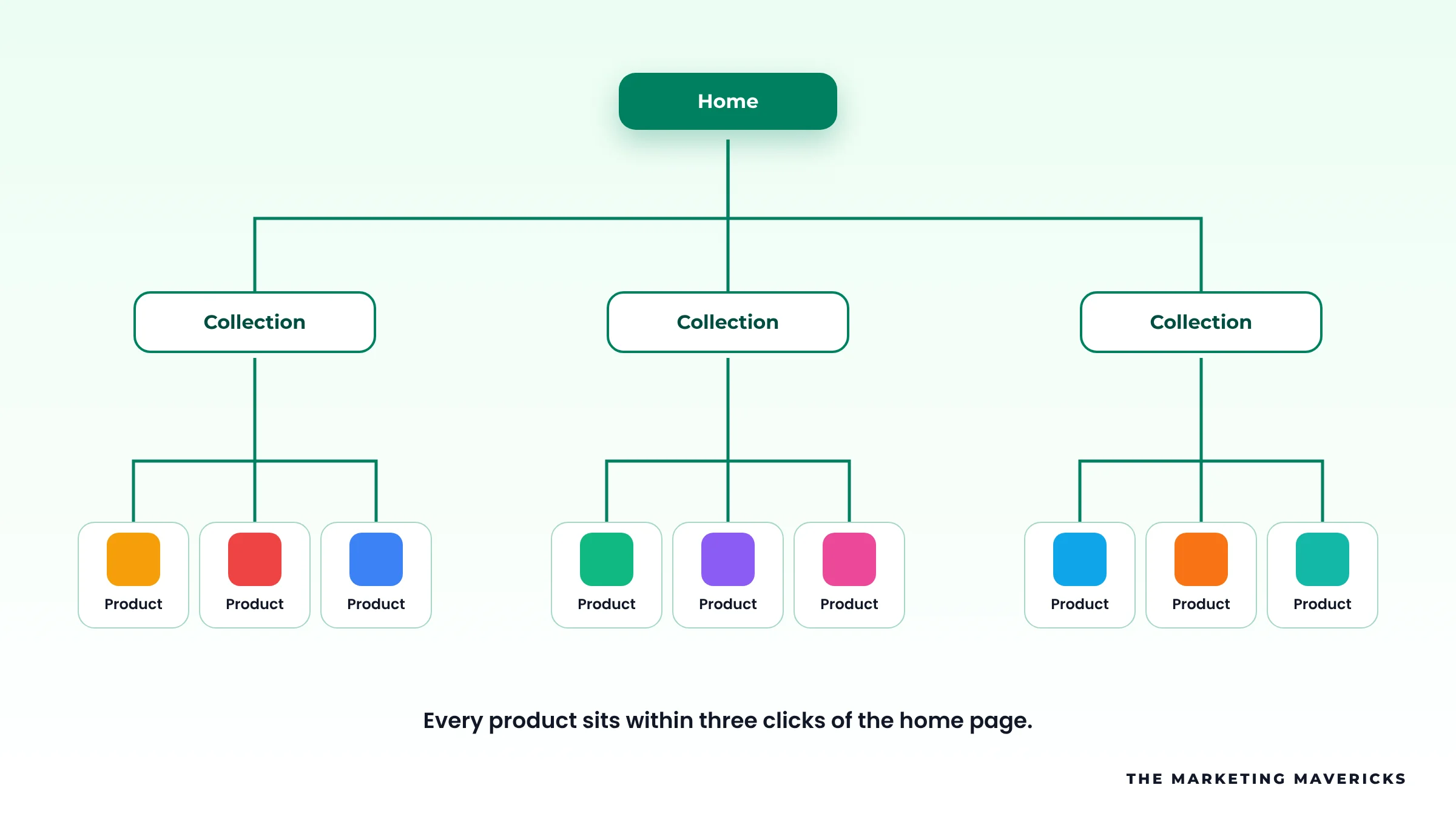
- Put your main collections in the header menu, with sub-collections where the range is large.
- Turn on breadcrumbs in your theme so each product links back to its collection.
- Link related products from product pages, and collections from blog posts.
Collection Page SEO
Collections target the biggest search terms in a store, yet most are just a heading and a product grid. Give each one:
- A short, unique intro above the grid: two or three sentences on what the range covers and who it suits.
- Helpful copy below the grid on sizing, materials, care or buying advice.
- A custom title and meta description, edited in the search engine listing section of each collection.
Title:   [Collection name] | [Main benefit] | [Store name]
Example: Women's Running Shoes | Light and Cushioned | Stride Co

Meta:    Shop [collection] for [use or buyer]. [Range or fit note].
         [Delivery or returns promise].
Example: Shop women's running shoes for road and trail. Sizes for
         every fit, with fast delivery and easy returns.
Product Page SEO
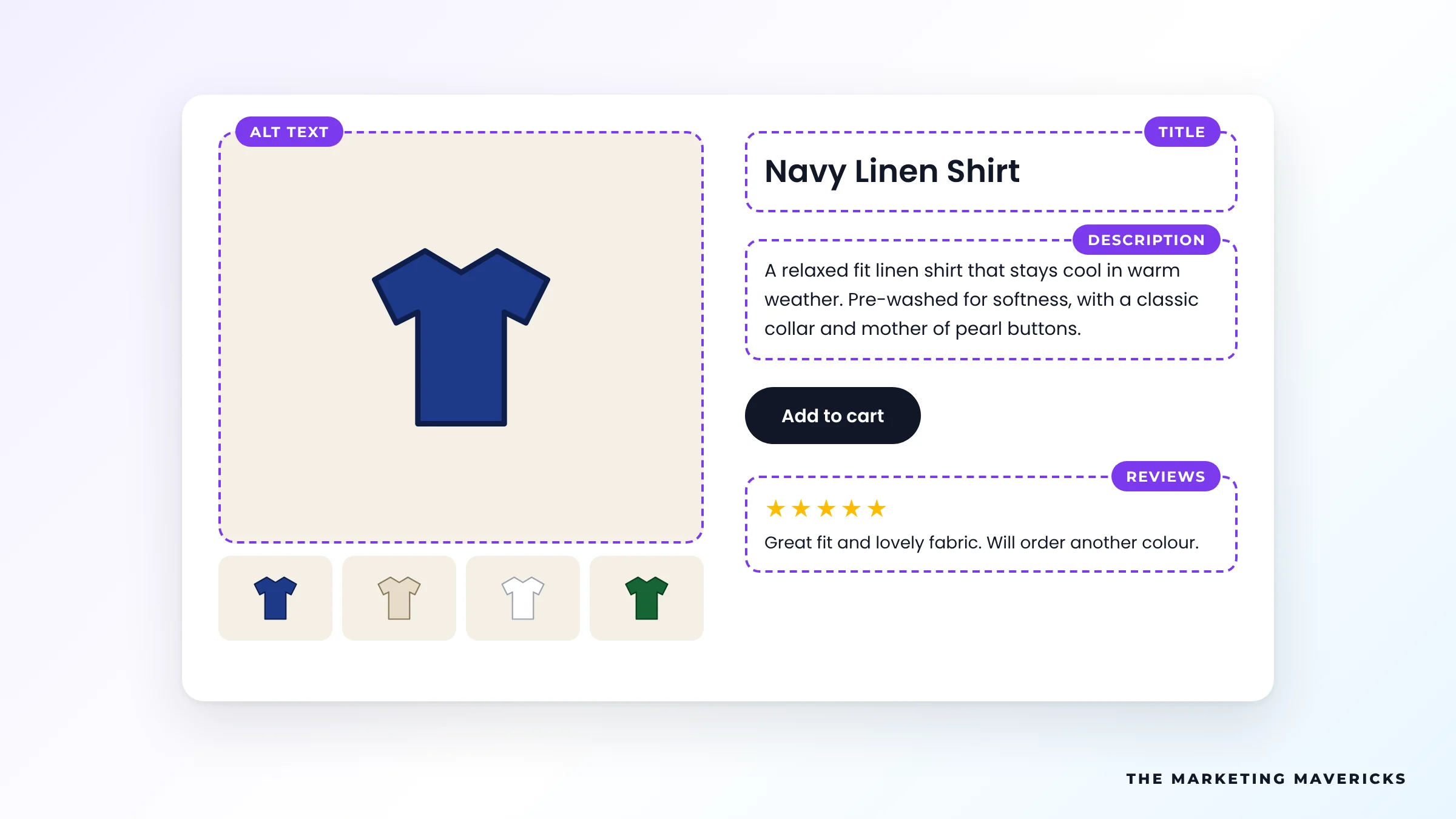
Manufacturer descriptions appear on every retailer selling the same item, so they give Google no reason to rank your page over theirs. Write your own.
- Unique descriptions. Cover what it is, who it is for, materials, sizing and how it differs from similar products.
- Image alt text. Describe each image plainly, such as navy linen shirt, front view. It helps accessibility and image search.
- Reviews. Use a reviews app that shows reviews as text on the page, not only inside a widget.
- Clear title tag. Product name, key attribute and store name, written for people first.
Page Speed and App Bloat
Storefront apps add scripts, and some leave code in your theme after you uninstall them. A slow store hurts both rankings and sales.
- Remove apps you no longer use, then check theme files for leftover code.
- Compress images and upload them at sensible sizes. Shopify serves modern image formats to browsers that support them.
- Limit sliders, pop-ups and autoplay videos.
- Check Core Web Vitals in Google Search Console and test key templates in PageSpeed Insights.
Structured Data on Shopify
Structured data helps Google show price, stock and star ratings in results. A Shopify product page should output:
- Product: name, image, description, brand and SKU or GTIN.
- Offer: price, currency and availability.
- Review and AggregateRating: usually added by your reviews app.
- BreadcrumbList: the path from home to collection to product.
Themes and apps often each add their own markup, which can leave duplicate or incomplete Product data. Paste a product URL into Google's Rich Results Test, see exactly what is detected, then remove the duplicates so one clean set remains.
Out-of-Stock and Discontinued Products
Temporarily out of stock: keep the page live. Offer a back-in-stock alert and link to similar products. Availability in your structured data should read OutOfStock.
Discontinued for good: add a 301 redirect in Shopify's URL redirects tool to the closest replacement product or its collection, so the page's links and rankings are not lost.
Blog Content That Answers Buyer Questions
Your blog can rank for the questions shoppers ask before buying: how to choose, how to size, how products compare and how to care for them. Answer one question fully per post, then link to the collection or product that solves it. That passes internal link value to the pages that sell.
Connect Google Merchant Center
Link your store to Google Merchant Center through the Google and YouTube app. Your product feed then becomes eligible for unpaid product listings in the Shopping tab and other Google surfaces, and the same feed powers Shopping ads if you run them later. Keep prices, stock and titles in the feed matching your product pages. Our guide to Google Shopping ads for ecommerce covers the paid side.
Getting Products Cited in AI Answers
ChatGPT, Gemini and Google AI Mode lean on the same signals: crawlable pages, clear product facts, consistent data and independent reviews. Product pages that state specifications, sizing and use cases in plain sentences and tables are easier for AI to quote. Our generative engine optimisation work covers this in depth.
Common Shopify SEO Problems and Fixes
| Problem | Why it matters | Fix |
|---|---|---|
| Grids link to /collections/x/products/y | Internal links point at non-canonical URLs | Remove within: collection from product cards |
| Manufacturer product descriptions | Same text as every other retailer | Write unique descriptions |
| Empty collection pages | Nothing to rank on main category terms | Add unique intro and buying copy |
| Too many apps | Extra scripts slow every page | Remove unused apps and leftover code |
| Duplicate Product schema | Confusing rich result data | Keep one source and test it |
| Deleted products with no redirect | Lost links and broken pages | 301 to the closest product or collection |
| Missing alt text | Weak image search and accessibility | Describe every product image |
Shopify SEO Checklist
Tick what is already done on your store to see where to start.
Tick what is true for your store today
Tick each statement that is true today to see where you stand.
Frequently Asked Questions
Is Shopify good for SEO?
Yes. Shopify handles sitemaps, canonical tags, SSL and mobile-friendly themes out of the box. Rankings then depend on structure, unique content, speed and links.
Can I change the /products/ and /collections/ URLs in Shopify?
No, those prefixes are fixed for every store, and they do not hold back rankings. You can edit the handle after the prefix, and Shopify can create a redirect from the old URL when you do.
Should I delete out-of-stock products?
Not if they are coming back. Keep the page live with alternatives. For products gone for good, redirect to the closest product or collection.
Do I need an SEO app for Shopify?
Not always. Most essentials live in the Shopify admin and your theme. An app can help with bulk edits on large catalogues, but every app adds weight.
How long does Shopify SEO take to show results?
Technical fixes can show within weeks of Google recrawling the store. Content and authority work on competitive collections usually takes several months.
Want Your Shopify Store Ranking on Google?
Our SEO team handles structure, content and technical fixes for Shopify stores worldwide, and you can see the results in our SEO portfolio.
Talk To Our Team →